Welcome . . Product Categories. . What's New . . Sale Items . . Communications
E-Mail . . How to Order . . Order Form . . Catalog . . Legal Notices

 .
iPhone / iPod Touch
Experimenter Product / Kit Listing ........... Legal Note .
iPhone / iPod Touch
Experimenter Product / Kit Listing ........... Legal Note |
||
| iPad /iPhone
14-Ch IR Relay Board iPad / iPhone Control 14 SS Relays |
IR Board Add-On Controllers Servos, AC/DC Power, Sound Control |
IR Detector / Test
Board IR Diode Tester |
| IR - 1
Ch Latching Relay IR - Mech Latching Relay Switch |
IR - 1 Channel Servo
Control R/C Servomotor RF Interface- 1 Ch |
IR Extender Board IR to IR Distance |
| IR Module
Controller - 7Ch 7-Ch TTL Output IR Decoder |
IR - 1 Channel Relay
Switch IR - Mechanical Relay Controller |
|
| .
iPhone Experimenter
Resources / Help |
||
| IR Sensor - DIY IR Sensor Detector / Tester - DIY iPhone Port Pinout General Technical Help |
iPhone Links Blue Point Engineering iPhone WebSite Blue Point Engineering iPhone WebSite Setup |
|
| 14 Channel IR Relay Board | Item Description | ||||||||||||
|
R 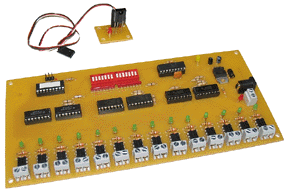 |
This unique Relay board can be controlled by an iPhone / iPad
or any Sony handheld IR Remote. The IR controller board has Momentary or Toggle modes for
each of the 14 Channels, different output combinations can be
momentary or toggled. |
||||||||||||
Out Of Stock Custom Order, Please Contact Blue Point Engineering for Details |
|||||||||||||
| IR Relay Board Add- On Controllers |
Item Description | ||||||||||||||||||||||||
|
R  |
This unique Relay board can be controlled by an iPhone / iPad. The IR controller board has Momentary or Toggle modes for
each of the 14 Channels, different output combinations can be
momentary or toggled. |
||||||||||||||||||||||||
|
|||||||||||||||||||||||||
| IR Detector / Test Board | Item Description | ||||||
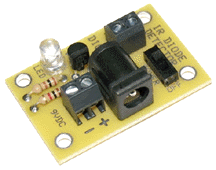 |
This unique board will allow the experimenter to test various IR Diodes and check any IR device to see if it is operating correctly. |
||||||
|
|||||||
| IR 1- Ch Relay Board | Item Description | ||||||
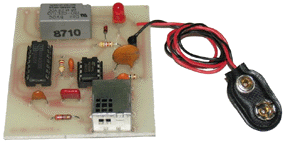 |
Using the iPhone IR Sensor and IR Application you will be able to turn ON and OFF this one channel relay board. Relay Board Specifications: |
||||||
|
|||||||
| IR 1- Ch Latching Relay Board | Item Description | ||||||
|
|
Available Soon Using the iPhone IR Sensor and IR Application you will be able to turn ON and Latch ON a one channel relay board. Relay Board Specifications: |
||||||
|
|||||||
| IR 1-Ch R/C Servo Controller | Item Description | ||||||
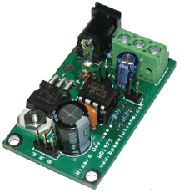 |
Available Soon Using the iPhone IR Sensor and IR Application you will be able to move a R/C servo motor from position A to B and back from B to A under iPhone IR control. |
||||||
|
|||||||
| IR Module Controller | Hardware Description | ||||||
 Click on Image for a Closeup View |
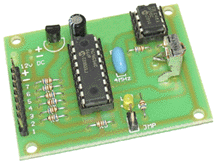
This IR-Decoder has 7 individual TTL (0 or +5V) level outputs
which can be programmed to correspond to any button on an IR
remote control and can be set-up for one of two options: to toggle
the output between 0 and +5v whenever the particular button is
pressed or momentary output which remains at +5v only when the
button is pressed. |
||||||
|
|||||||

 ...iiPhone
- iTouch ...
...iiPhone
- iTouch ... |
|
| TRADEMARKS
/ PRODUCTS IN USE Apple © is a registered trademark of Apple Computer, Inc. iPhone, iPod Touch is a trademark / Product licensed to Apple Computer, Inc. All other unregistered and registered trademarks are the property of their respective owners. Apple Corporation is not affiliated with Blue Point Engineering, and does not recommend, support or endorse any of Blue Point Engineering products, links, applications or any other related items to the iPhone, iPod touch or other Apple Computer owned products. The iPhone, iPod Touch is a trademark / product licensed to Apple Computer, Inc. |
|
DISCLAIMERS
|
| LINK TO WEB SITES Blue Point Engineering LLC. has not reviewed all of the web sites linked to this web site and is not responsible for the contents of any off-web site pages or any other web sites linked to this web site. Your linking to any other off-web site pages or other web sites is at your own risk. |