| Question: |
Can the Wizard -1 board
be operated from a Battery Power Supply? |
| Answer: |
Yes, the Wizard -1 board
can be operated from a 5 Vdc battery, or a combination of R/C
battery pack, and 9 Vdc battery. You will not get as much operating
time from the battery as from the wall power supply, but for
remote operation a battery will work. The amount of operation
time will be based on the size of the battery and the configuration
used to power the servos and Wizard Board. ( Hook-up and configuration
drawing are included with the "Wizard Board".) |
|
Question: |
Can the Wizard -1 board operate the new higher
power servos? |
| Answer: |
Yes, the Wizard -1 board can operate the newer
servos. You will need to power the servos from a different power
supply (6- VDC) and connect the servo signal and the power supply
operating the servos back to the Wizard - 1 Board. (See the pdf
documents for more information on operating large servos from
the Wizard- 1 board)
Connecting
Large Power Servos |
|
Question: |
I would like to operate
the servo and digital output playback motion manually as people
pass near a booth. Can I do this, and how could I start the manual
playback? |
| Answer: |
The "Wizard -1 board "
has a built in connector where a remote switch can be attached.
The remote switch can be as simple as a toggle switch that is
pressed manually to start the playback, a floor mat switch that
someone might step on or a complex system such as a laser, or
optical beam switch placed between a door way frame, that would
activate the "Wizard playback program" when triggered. |
| Question: |
Can the "Wizard -1 board "
operate my sound system and fog machine I use in my haunted house
set? |
| Answer: |
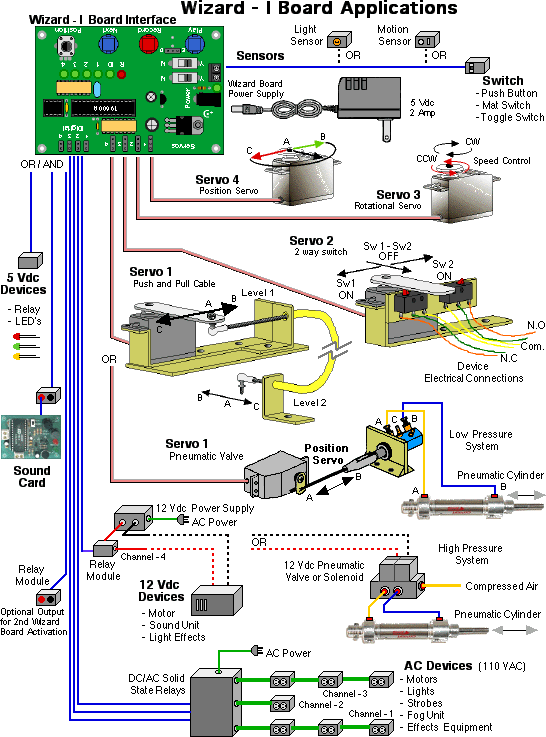
Yes, the "Wizard -1 board "
can operate those devices and others through the digital outputs.
The digital outputs can be programmed to turn ON and OFF when
needed. By using optional accessory boards available to add to
the "Wizard" or with your own parts set-up, you can
control 115 VAC devices, activate relays, turn on 5 Vdc LED effects,
control the direction CW, CCW of a DC motor or even activate
pneumatic valves to operate a cylinder connected to that skeleton
prop. ( Hook-up and configuration drawing are included with the
"Wizard - I Board" on how to use the digital outputs). |
| Question:: |
Do I need to purchase special servos to use with
the "Wizard -1 board "? |
| Answer: |
No, you can use standard R/C servos
found in most hobby shops or R/C centers. The "Wizard -1
board " servo outputs provide standard pulse coded signals
of between 1 msec and 2 msec duration repeated every 20 msecs
making it suitable for all standard hobby +5 Vdc R/C type servos
found. |
| Question: |
Will I need a joystick or
other special device to operate the servos and do programing? |
| Answer: |
No, you won't need any other devices
connected to the "Wizard -1 board " to control or program
it. The "Wizard - I Board" has a potentiometer build
onto the board that works like a joystick, in that it allows
you to control the motion of a servo during recording, manual
operation, and also sets the delay rate between automatic playback
loops. The "Wizard - I Board" also has a set of built
in key buttons that help you in programming, playback activation
and selecting of servo and digital channels. All the parts needed
to program, playback, and control the "Wizard - I Board"
are built into the board. |
|
Question: |
If I spend a lot of time creating
the perfect show program, how can I protect the recorded program
from not being erased and what if I want to make other animatronic
characters I have use the same program show recorded.? |
|
Answer: |
The "Wizard -1" has several
options that you can use to protect your recorded program.
There is a jumper block that can be moved or removed to prevent
the EEPROM with the recorded program in memory from being erased
accidentally. Using the Blue Point Engineering EEPROM copy service,
or purchasing your own very low cost EEPROM burner from Blue
Point Engineering, you can remove the programmed EEPROM and make
copies of it to use with other "Wizard -1 board " connected
to animatronic characters you have. The ease of programming,
copying the EEPROM and placing a copy into another "Wizard
- I Board" controlled animatronic character makes mass producing
animatronic products and shows very easy to do. |
| Question: |
If Power is turned OFF to
the "Wizard -1 board " will my recorded program be
lost? |
| Answer: |
No, the program is stored
in the EEPROM memory, ready to use, or until you erase it |
| Question: |
How can I get the "Wizard
-1 board " to start up automatically and play my recorded
program. |
| Answer: |
The "Wizard -1 board
" has an optional auto feature switch that can be selected
that will automatically start up and run the recorded program
when power is first applied. By selecting the optional "Auto
and Loop" switch combination settings you can get your program
to start and loop automatically or start and wait for the trigger
switch to be activated. This "Wizard - I Board" feature
is especially handy if you have a room of animatronic characters
running from several "Wizard - I Boards" and you need
the ability to power on everything with a master switch and be
ready to operate in a few seconds without having to go around
an start up your animatronics or attached devices. This feature
is also very handy when power is unexpectedly turned OFF and
then back ON again. |
| Question: |
What comes with the "Wizard
-1 board " when I purchase one? ......[
[ Purchase
Wizard - I Board ] |
| Answer: |
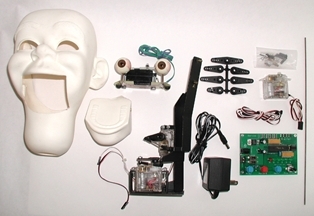
The "Wizard -1 board " comes ready to use with all
the components assembled onto the interface board, a detailed
instruction guide, illustrated guide on hooking up the board
to various digital outputs, schematics and ideas for accessory
device control and technical support from the Blue Point Engineering
team.
You will only need to purchase Servos (1-4) and a power supply
(5 Vdc- 2 Amp) to get started immediately in controlling servos.
These items can also be purchased from Blue Point Engineering
if wanted and can be put together as a complete system ready
to use. You can also purchase optional accessory boards to connect
to the "Wizard -1 board " if you need a quick digital
control set-up or don't want to do it yourself in connecting
digital output devices together.
Later on you may want to purchase a few parts as listed in
the user guides to do some advanced digital output control. The
illustrated guide show you how to hook up the board to do some
advanced device control methods as well as identifying parts
needed.
|
| Question: |
How can I add recorded sound to the Wizard
-1 board to make my character come alive?
( I would like to use digital voice and / or sound effects ) |
|
Answer: |
By combining the "Sound Boards" ( 120
Sound Module ) or ( Sound
Board 60 ) with the "Wizard -1 board " and using
the digital outputs, you can turn ON and OFF the sound card when
needed. This combination allows you to create a character that
has motion and recorded sounds.
You can also add your own CD player or sound system and using
the digital outputs switch ON and OFF the CD player or sound
system from the Wizard - I digital drivers.
|
| Question: |
I need to operate 8 Servos,
but the "Wizard -1 board " has only 4 servo outputs.
What can I do? |
|
Answer: |
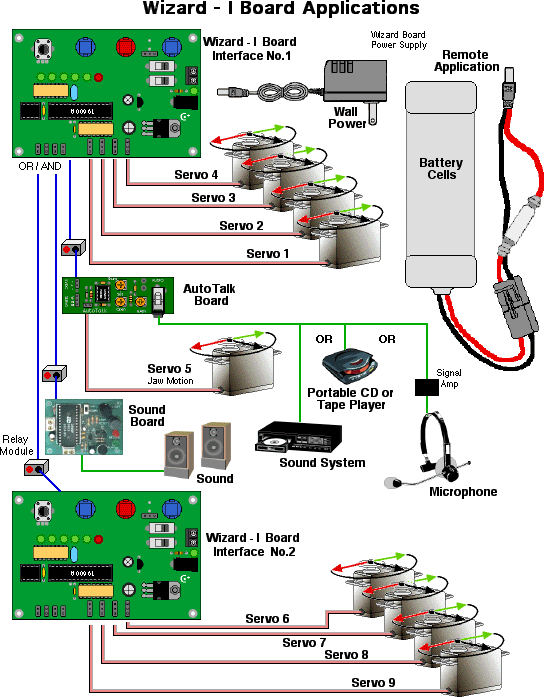
By combining,, stacking together
two "Wizard -1 board " you can get the needed number
of servo outputs. A single power source can be used to power
both boards, as well as a single switch can also be used to trigger
both boards simultaneously.
This method has several advantages in that you can place a board
close to where the servos are needed, without having to run a
lot of extension wires. (Example: One board in animatronic character
head, operating eyes, mouth, other board placed in body to operate
arms, neck motion, both synchronized and working together as
needed.) |
| Question: |
I need to operate an Animatronic
head, that has eye motions, expressions and I need a mouth movement
that is directly synchronized to a voice track or live sound.
I will need to operate 5 servos also, what can I do? |
|
Answer: |
By using the"Wizard -1 board"
and the "AutoTalker
Board" together, you can get the effect you want and
the number of servos needed. The "Wizard - I Board"
can control the eyes and expression motions and the AutoTalker"
connected to the mouth / jaw servo can be connected to a sound
system or microphone giving motion directly synchronized to a
voice track or live sound.
A single power source can be used to power both boards, as well
as a single switch can also be used to trigger the "Wizard
- I Board and sound system simultaneously. |
|
Question: |
I hear that a new advanced "Wizard
board is available. Where can I find information on the advanced
"Wizard - II Board" |
|
Answer: |
We have several new "Family of Wizard Boards coming
out. The Wizard - II board is now available, and our other unique
Wizard Boards will be released from our R&D department very
soon.
You can now find information on the Wizard - II board at:
Wizard - II Board
Information
Wizard - II Board pdf file
Blue Point Engineering
|